

Ford SYNC 4 vs. SYNC 4A: Features, Differences, and Compatibility
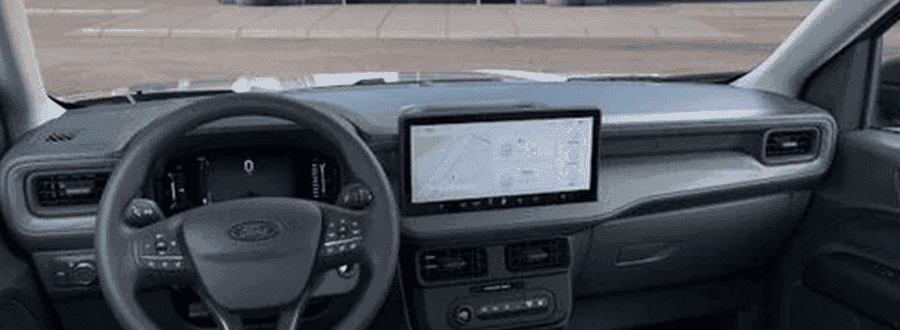
Ford SYNC 4A is distinguished from standard SYNC 4 primarily by its vertical screen orientation and interactive Adaptive Dash Cards, which dynamically stack and prioritize your most frequently used functions at the top of the display. While SYNC 4 uses a traditional horizontal layout with fixed split-screen windows, both systems share core connected architecture, including Ford Power-Up over-the-air software updates, wireless Apple CarPlay and Android Auto, Connected Navigation, and cloud-based Enhanced Voice Recognition.
Understanding these structural differences is essential for maintaining your vehicle’s electronic systems and getting the most out of your driving experience. Hardware layout plays a central role in how each system operates. Standard SYNC 4 is engineered for landscape-oriented displays ranging from an 8-inch center display up to a 12-inch touchscreen. It relies on a multi-window horizontal interface where secondary feature panels — such as audio controls or trip data — are manually assigned alongside the main screen area. In contrast, SYNC 4A is optimized for large portrait-oriented touchscreens, such as the 15.5-inch touchscreen, eliminating the traditional main menu button in favor of an adaptive, auto-organizing interface.
From a service and technical perspective, it is important to recognize that SYNC 4 cannot be retrofitted or upgraded to SYNC 4A through a software flash. The two systems rely on distinct Accessory Protocol Interface Modules (APIM), internal display processing hardware, and specialized wiring harnesses tailored to their respective screen geometries. Attempting aftermarket modifications or unauthorized software installs can compromise module communications across the controller area network (CAN bus) and disrupt integrated vehicle functions like climate controls or driver-assist display interfaces.
Proper electrical maintenance remains vital to keeping both infotainment architectures running smoothly. Voltage drops caused by an aging 12-volt battery can cause boot lag, intermittent touchscreen unresponsiveness, or failed module handshakes at startup. If you experience screen freezing or delayed menu responses, reaching out to our service team or stopping by our service center in Stuart allows certified technicians to perform a full system scan and battery health check. You can also give us a quick call to discuss any technical questions regarding your display system.
How Do Adaptive Dash Cards Work and Can They Be Customized on SYNC 4A?
Adaptive Dash Cards on SYNC 4A function as dynamic digital cards that automatically organize your active applications—including navigation, media playback, phone calls, and trip diagnostics—into a prioritized vertical list based on recency and usage frequency. Standard SYNC 4 does not support Adaptive Dash Cards, relying instead on fixed horizontal split-screen panels that require drivers to manually assign secondary view widgets.
The interactive nature of Adaptive Dash Cards simplifies cabin interactions while driving. When an app is active, its card automatically expands toward the top of the portrait display, providing direct touch controls like pausing audio tracks or accepting hands-free calls without forcing you to exit your primary map view. Tapping any lower card instantly swaps it into full focus, collapsing the previously active application down into the card stack below.
While the system dynamically reorganizes cards based on driver habits over time, users retain control over screen organization and quick-access settings. The persistent shortcut bar at the bottom of the screen can be configured with specific feature toggles, such as heated seat controls or designated phone contacts. Furthermore, creating individual Driver Profiles allows households with multiple drivers to store unique card configurations, audio presets, climate preferences, and mirror positions that reload automatically upon startup.
Maintaining touchscreen responsiveness requires proper physical care and periodic system maintenance. Dust, fingerprints, and environmental residue can interfere with capacitive touch sensors over time. Cleaning the screen with an anti-static, non-abrasive microfiber cloth designed specifically for automotive displays prevents scratching and preserves touch accuracy. If a card layout becomes sluggish or fails to update after a software refresh, a soft system reset—performed by holding the audio power button and right seek button simultaneously for 10 seconds—reboots the APIM without erasing saved user profiles. For OEM-approved screen cleaning accessories or physical hardware inspections, feel free to contact our parts department for expert advice.
How Do Navigation Displays, Video Streaming, and Shared Features Compare?
Navigation displays differ substantially between the two systems due to screen aspect ratios, with SYNC 4A presenting high-definition map views across the upper section of its vertical screen while SYNC 4 utilizes a wider, traditional horizontal map view or split-screen side card. Despite these visual layout differences, both systems share identical cloud-connected navigation software that delivers real-time traffic updates, weather overlays, and predictive route suggestions based on driving history.
For local commuters driving through Palm City across the St. Lucie River bridge during peak traffic hours, Connected Navigation dynamically monitors route congestion and calculates fast detour options before delays compound. Both systems utilize cloud connectivity to process turn-by-turn guidance and route recalculations in real time, provided the vehicle maintains an active Ford App Connect data connection.
In addition to navigation, both SYNC 4 and SYNC 4A offer integrated video streaming capabilities for parked vehicles. Drivers can access streaming applications such as YouTube or NBC News directly through the touchscreen display while parked at a rest stop or waiting in a parking lot. To support streaming data requirements and connected apps like Alexa Built-in, vehicles can utilize the available Ford Connectivity Package or connect to an in-vehicle Wi-Fi hotspot powered by 4G/5G networks.
Core connectivity and voice control capabilities are fully aligned across both platform variants. Shared features include:
- Wireless Apple CarPlay and Android Auto integration, eliminating the need for physical USB tethering cables.
- Cloud-based Enhanced Voice Recognition, allowing natural conversational commands for climate adjustments, hands-free phone calls, and media selections.
- Over-the-air Ford Power-Up software capability to deliver system enhancements continuously throughout ownership.
- Multi-device Wi-Fi hotspot support capable of connecting up to 10 mobile devices within 50 feet of the vehicle.
Which Ford Models Come Equipped With SYNC 4 versus SYNC 4A?
Ford equips vehicles with SYNC 4A primarily on models featuring large portrait-oriented display assemblies, whereas SYNC 4 is utilized across vehicles built with wide horizontal touchscreen configurations. System availability is directly linked to interior dashboard architecture and designated vehicle trim levels rather than standalone software options.
Vehicles featuring SYNC 4A as standard or available equipment include:
- Mustang Mach-E: Features SYNC 4A paired with a massive 15.5-inch touchscreen standard across trims, including Select, Premium, and GT.
- Ford Edge: Outfitted with SYNC 4A and a 12-inch vertical center screen on higher trim levels.
- F-150 Lightning: Equips SYNC 4A on select high-tier trims equipped with the vertical screen package.
- Ford Ranger: Standard SYNC 4A functionality paired with 10.1-inch or 12-inch touchscreens depending on trim level, such as the Ranger Raptor.
Vehicles equipped with standard SYNC 4 include:
- Ford F-150: Features standard SYNC 4 with a 12-inch touchscreen horizontally integrated across most trim levels, alongside a matching 12-inch digital gauge cluster.
- Ford Bronco: Employs horizontal SYNC 4 displays optimized for rugged dashboard layouts and physical switchgear integration.
- Ford Explorer and Escape: Utilize horizontal SYNC 4 screen layouts designed for wide-format dashboard styling.
Because SYNC 4A is tied to premium vertical display hardware and higher equipment groups, selecting a vehicle trim equipped with SYNC 4A generally corresponds to a higher overall vehicle equipment tier compared to base trims running standard SYNC 4. From a service standpoint, both hardware setups utilize high-grade automotive connectors and thermal management heatsinks behind the dashboard to ensure stable performance under high ambient cabin temperatures.
How Do Ford Power-Up OTA Updates and System Maintenance Work?
Both SYNC 4 and SYNC 4A support Ford Power-Up over-the-air (OTA) software updates, allowing Ford to deliver continuous system enhancements, bug fixes, feature additions, and security patches directly to the vehicle. These wireless updates reduce the need for physical service appointments for routine software maintenance, keeping your infotainment hardware running at peak performance throughout its operational lifecycle.
To ensure OTA updates download and install smoothly, vehicle owners should establish a routine update schedule through the system settings menu:
- Select Settings on the central touchscreen display.
- Tap System Updates or About to review the current software build version.
- Toggle Automatic Updates to the ON position.
- Connect the vehicle to a secure home Wi-Fi network or verify that the embedded cellular modem has active signal reception.
- Set a recurring installation schedule (such as overnight) for updates that require the vehicle to be parked and powered off.
Vehicles parked near coastal areas in Stuart benefit from periodic health checks during scheduled oil changes or multi-point inspections, as certified technicians can run diagnostic scans to confirm all background module updates have executed cleanly. Environmental factors like high humidity and salt air make maintaining clean electrical ground connections and steady battery voltage critical for reliable ECU and APIM communications during overnight background downloads.
If an OTA update becomes paused or fails to complete due to weak Wi-Fi signal or low battery voltage, our factory-trained service team can manually push the recalibration file through Ford’s diagnostic service software (FDSL). You can easily book your service appointment online to have our technicians verify your software status and perform necessary module updates.
Common Questions About Ford SYNC 4 and SYNC 4A System Service
Q: Can standard SYNC 4 be upgraded to SYNC 4A through a software update?
No, standard SYNC 4 cannot be upgraded to SYNC 4A via software alone. The two systems rely on different physical screen orientations, distinct Accessory Protocol Interface Modules (APIM), and unique wiring harnesses. SYNC 4A requires portrait screen architecture designed for Adaptive Dash Cards, whereas SYNC 4 is built specifically for horizontal displays. Attempting to force aftermarket flashes can damage integrated electronic control modules.
Q: What should I do if my SYNC touchscreen freezes or stops responding?
If your touchscreen freezes, you can perform a soft system reboot without losing stored driver data. Press and hold the audio system power button and the right seek button on the steering wheel or center console simultaneously for 10 seconds. The screen will black out and reboot the APIM software. If freezing recurs frequently, schedule a diagnostic check to inspect for pending software updates or low 12-volt battery voltage.
Q: Do over-the-air software updates erase my saved settings and profiles?
Major Ford Power-Up updates are designed to preserve custom settings, radio presets, paired Bluetooth devices, and Driver Profiles. However, major system architecture patches may occasionally reset user preferences to default values. Taking a moment to check your shortcut bar and saved navigation favorites after a major update notification ensures your custom configuration remains intact.
Q: Why does my Ford require a Wi-Fi connection for certain software updates?
While small system patches transfer via the vehicle’s embedded cellular connection, larger system updates require a high-speed Wi-Fi connection to download comprehensive software packages efficiently. Connecting your vehicle to a home Wi-Fi network ensures fast download speeds and prevents background transfer interruptions. You can learn more about our team and our technical capabilities if you need assistance configuring connected settings.
Q: Does video streaming work while driving on SYNC 4 or SYNC 4A?
No, video streaming applications like YouTube or NBC News are restricted to when the vehicle is safely parked in Park (P). For safety reasons, the infotainment software automatically blocks video playback and locks visual entertainment apps as soon as the transmission is shifted out of Park or vehicle movement is detected. Audio streaming apps remain accessible while driving via voice control or steering wheel switches.
Prices and MSRP referenced in this article are estimates for informational purposes only and do not constitute an offer to sell. See dealer for complete details.
Fuel economy estimates shown may differ from official EPA ratings and should not be relied upon as a guarantee of actual vehicle performance.

0 comment(s) so far on Ford SYNC 4 vs. SYNC 4A: Features, Differences, and Compatibility