

Ford App Explained: Remote Start, Vehicle Status, Service Scheduling, and More
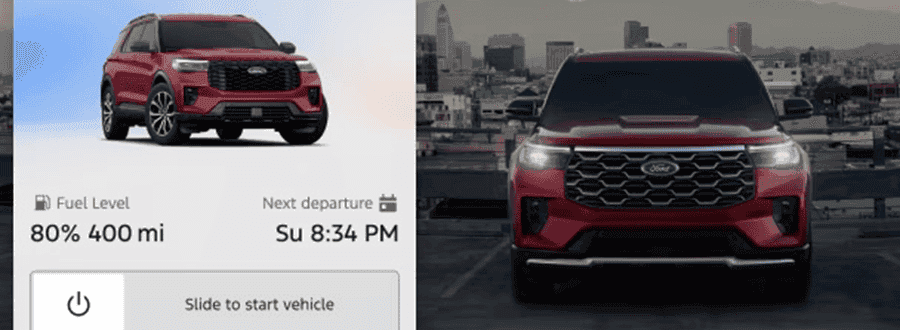
The Ford app gives vehicle owners complete wireless access to start or stop the engine, lock or unlock doors, track real-time GPS location, and precondition interior climate control directly from a smartphone. Enabled by an embedded cellular modem, these remote commands work virtually anywhere you have cellular coverage, allowing you to secure or cool down your vehicle before stepping inside.
Modern connected vehicles have transformed how drivers interact with their trucks and SUVs before even opening the door. By pairing your smartphone with your vehicle through an active cellular modem, essential commands are available at your fingertips whether you are standing in your driveway or sitting at an office desk miles away. The platform brings immediate convenience to daily routines, eliminating the traditional range limitations of standard key fobs.
For drivers navigating the humid coastal heat in Stuart, the ability to activate climate control remotely is a major benefit. After a day parked near the St. Lucie River shoreline, stepping into a pre-cooled cabin makes every drive more comfortable. Through the app interface, sending a command takes seconds, prompting the vehicle to verify security parameters before engaging the starter and setting the cabin temperature to your preferred level.
Beyond climate preparation, remote locking provides reliable security management. If you ever walk away from your vehicle and question whether you locked the doors, the live status indicator inside the app provides immediate confirmation. You can issue a lock or unlock command from anywhere, ensuring your cargo and cabin contents remain safe. If you want to see these features in action on a new vehicle, drop by our showroom at 4000 Se Federal Hwy or give our team a quick call to walk through a live vehicle setup.
How Does Remote Start Work in the Ford App and What Is Required to Set It Up?
Remote start in the Ford app operates by transmitting an encrypted cellular signal from your mobile device to your vehicle’s factory Ford App Connect modem, triggering the ignition and automatic climate controls. To function, the vehicle must be equipped with an automatic transmission, power door locks, an activated modem, and be paired with your account via the vehicle touchscreen.
Setting up the system takes only a few simple steps during vehicle delivery or at home:
- Download the Ford app from your smartphone’s app store and log in or create an owner account.
- Add your vehicle by entering or scanning its unique 17-digit Vehicle Identification Number (VIN).
- Turn on the vehicle ignition, accept the pairing prompt on the central touchscreen display, and confirm account authorization.
- Verify connected features on your phone screen, where the central start button icon will illuminate when ready.
To initiate a remote engine start, press and hold the start icon in the app until the outer status ring completes its sequence. The vehicle receives the signal, confirms that the automatic transmission is safely in park and the doors are secured, then turns on the engine and exterior parking lights. By default, the engine runs for up to 15 minutes before automatically turning off to conserve fuel and ensure safety. If you need additional time before heading out, sending a second start command extends the runtime.
Proper setup also unlocks remote convenience for second owners. If you choose to explore our pre-owned Ford inventory, late-model pre-owned vehicles with embedded modems offer these same cellular remote start capabilities once a simple master system reset is performed on the touchscreen to pair your phone.
What Vehicle Status Information Can You Monitor for Daily Commutes and Trip Planning?
The Ford app provides real-time monitoring of essential vehicle health metrics, including exact fuel level, EV battery percentage, tire pressure readings through individual TPMS sensors, remaining oil life, total odometer mileage, and door-lock status. This live telemetry allows drivers to assess vehicle readiness and plan fuel stops before embarking on daily drives or long highway trips.
Monitoring live vehicle health directly from your mobile device transforms how you handle routine driving prep. Instead of walking out to the garage to check instrument gauges before a morning commute, a quick glance at the smartphone dashboard reveals your exact fuel range or battery state of charge. This connectivity eliminates guesswork and helps prevent unexpected delays when heading out for early appointments.
For daily commuters evaluating efficient crossovers like the 2026 Ford Escape—which features an available 1.5L engine producing 180 hp and 199 lb-ft of torque paired with an automatic 8-speed transmission—tracking fuel consumption and tire pressures ensures you maintain optimal fuel economy on every commute. Individual tire pressure readouts highlight minor pressure drops caused by ambient outdoor temperature shifts long before a warning light illuminates on the dashboard.
The app also tracks maintenance indicators, such as remaining engine oil life percentage, allowing you to plan routine dealership visits around your personal schedule rather than reacting to a sudden warning. Drivers considering our new Ford Edge models or cross-shopping certified pre-owned Ford vehicles can rely on this embedded telemetry to protect their investment and maintain peak performance over years of ownership.
Is the Ford App Free to Use and Are There Ongoing Subscription Costs for New Owners?
Downloading the Ford app and accessing baseline remote features—including remote engine start/stop, door lock/unlock, vehicle locator, and health monitoring—is completely free for owners of compatible vehicles with an active modem. Optional premium features, such as in-vehicle 5G Wi-Fi hotspot connectivity, connected navigation, or BlueCruise hands-free driving assistance, may carry ongoing subscription fees following initial trial periods.
Ford includes core remote connectivity at no extra charge, setting it apart from competitors that place basic remote start behind a monthly paywall. When you purchase an equipped new or pre-owned vehicle, features like mobile engine starting, security locking, GPS pinpointing, and vehicle status reports remain active without required recurring app fees, provided the cellular network supporting the vehicle modem remains functional.
Connected capabilities expand further when exploring higher-tier trucks and SUVs. For example, high-capability models like the 2026 Ford F-150 King Ranch feature a 3.5L engine generating 400 hp and 500 lb-ft of torque with a SelectShift® transmission and a towing capacity of 10,400 lbs. On these well-equipped models, owners can manage advanced trailer light checks and zone lighting adjustments right from the mobile interface.
| Feature Type | Subscription Required? | Included Capabilities |
|---|---|---|
| Baseline Remote Controls | No (Complimentary) | Remote Start/Stop, Lock/Unlock, Vehicle Locator, Health Status |
| EV Management Tools | No (Complimentary) | Charge Monitoring, Target Charge Level, Cabin Preconditioning |
| Connected Navigation | Optional Trial / Subscription | Live Traffic Updates, Dynamic Rerouting, Predictive Maps |
| Wi-Fi Hotspot | Optional Trial / Data Plan | In-vehicle 5G Wi-Fi hotspot for up to 10 mobile devices |
| Advanced Driver Assist | Optional Trial / Subscription | BlueCruise hands-free highway driving technology |
When you are ready to upgrade your current ride to a modern connected truck or crossover, our team can help you value your trade-in online to establish your trade equity before visiting our showroom.
How Do GPS Location Tracking and App Features Enhance Your Ford Ownership Experience?
Integrated GPS location tracking in the Ford app pinpoints your vehicle’s precise coordinates on a smartphone map, making it simple to locate your car in crowded parking areas or manage multi-driver family households. Combined with health notifications and remote preconditioning, this feature adds peace of mind and daily convenience across every drive.
GPS tracking provides precise location mapping, which is especially helpful when navigating busy parking structures, commercial plazas, or crowded recreational areas. If family members share a vehicle, the primary account holder can quickly verify where the vehicle is parked or check its arrival status. The map interface can also display nearby fuel stations or public EV charging locations, simplifying route planning when fuel or battery range runs low.
In suburban communities around Port St. Lucie, where daily family schedules involve shuttle runs between sports parks, schools, and shopping centers, remote monitoring keeps parents informed about vehicle readiness and fuel levels. Commuters who come in for a first look usually want to see the cabin cool-down on the test loop before anything else, recognizing how much comfort precooling adds during warm afternoon drives.
For owners of electric models like the 2026 Ford Mustang Mach-E, the app extends functionality to include charge scheduling, departure time settings, and battery thermal preconditioning while plugged in. Pre-cooling or pre-heating the battery and cabin using grid power preserves vehicle battery range for the road ahead. If you are preparing to acquire a connected new vehicle, you can submit a financing application online to secure approval terms prior to your test drive.
Frequently Asked Questions About Ford App Setup, Connectivity, and Features
Q: Is there a fee for using remote start through the Ford app?
Many Ford owners appreciate that remote start is included at no extra charge when their vehicle has an activated modem. Unlike some manufacturers that require paid monthly subscriptions for basic app controls, Ford provides remote start, lock, and unlock functionality at no additional subscription cost.
Q: What should I do if my Ford app remote start command fails?
Remote start failures usually stem from low cellular signal at the vehicle location, an open door or hood, or low 12-volt battery voltage. Ensure all doors are locked, confirm your phone has internet access, and verify the vehicle is parked in an area with clear cellular coverage.
Q: Can I turn on heated seats or air conditioning when remote starting from my phone?
Yes, the Ford app utilizes your vehicle’s automatic climate settings to precondition the cabin upon remote start. Depending on ambient exterior temperatures, automatic climate control will automatically engage air cooling or heating, along with heated or ventilated seat functions on equipped models.
Q: How do I transfer app access when purchasing a used Ford vehicle?
When buying a pre-owned vehicle, perform a master reset on the vehicle’s center touchscreen to clear prior user accounts. Afterward, download the Ford app, scan or enter the vehicle VIN, and follow the on-screen prompt to pair your smartphone as the new primary account.
Q: How do I get assistance setting up the Ford app on my new vehicle?
Our sales team assists with app setup during the delivery process right on the showroom floor. You can stop by our showroom address on Se Federal Hwy, give our team a quick call, or learn more about our dealership team to schedule an in-person tech walk-through.
Prices and MSRP referenced in this article are estimates for informational purposes only and do not constitute an offer to sell. See dealer for complete details.
Fuel economy estimates shown may differ from official EPA ratings and should not be relied upon as a guarantee of actual vehicle performance.

0 comment(s) so far on Ford App Explained: Remote Start, Vehicle Status, Service Scheduling, and More